

NUMPY
In my previous article, I introduced you to NumPy. We learned what NumPy is, how it can be installed, and we worked with some NumPy operations.
To learn NumPy, we need to understand what array is.
Arrays
NumPy array is a powerful N-dimensional array object which is in the form of rows and columns.
Like other programming language, Array is not so popular in Python. In Python, Lists are more popular which can replace the working of an Array or even multiple Arrays, as Python does not have built-in support for Arrays.
But the question is, when to use arrays?
Lists are much more flexible than arrays. They can store elements of different data types including string. Also, lists are faster than arrays. But, if you need to do mathematical computation on arrays and matrices, you are much better off using something like the NumPy library.
Also, Python NumPy array consumes less memory and is more convenient.
Now let us learn, how to work with Array. We can use Lists to create an array.
Single Dimension Array
- import array as arr
- a = arr.array('d', [1.1, 3.5, 4.5])
- print(a)
OR
- import numpy as np
- a=np.array([1,2,3])
- print(a)
Note
But all the elements in the array must be of the same type (same Data Type).
- import array as arr
- a = arr.array('d', [1, 3.5, "Hello"]) // Error
OUTPUT

Multi-Dimension Array
- import numpy as np
- a=np.array([(1,2,3),(4,5,6)])
- print(a)
Now to iterate and print the same array:
- import array as arr
- a = arr.array('d', [1.1, 3.5, 4.5])
- print ("The new created array is : ", end =" ")
- for i in range (0, 3):
- print (a[i], end =" ")
- print()
OUTPUT

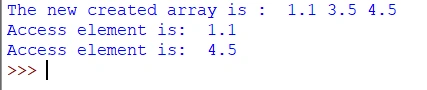
Accessing an element in the above array,
- import array as arr
- a = arr.array('d', [1.1, 3.5, 4.5])
- print ("The new created array is : ", end =" ")
- for i in range (0, 3):
- print (a[i], end =" ")
- print()
- print("Access element is: ", a[0]) // prints the element at index-0
- print("Access element is: ", a[2]) // prints the element at index-2
OUTPUT
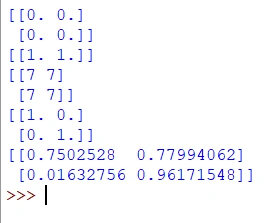
If you are using NumPy to create an array, we can use some shortcuts as well, as NumPy provides you with some in-built functions for the creation of basic arrays:
- import numpy as np
- a = np.zeros((2,2)) //prints 2x2 array of zeros
- print(a)
- b = np.ones((1,2)) //prints 1x2 array of ones
- print(b)
- c = np.full((2,2), 7) //prints 2x2 array of sevens
- print(c)
- d = np.eye(2) //prints 2x2 identity array/matrix
- print(d)
- e = np.random.random((2,2)) //prints 2x2 array of random numbers
- print(e)




Join the conversation! Your thoughts help the community grow.